
My kids go to kindergarten at the moment, and they often stay for lunch. We get the menus by email from the catering company, and we check them every now and then when planning meals.
The information arrives in the shape of a PDF file with the menus for the whole month. The format looks ideal for printing and putting up on the fridge. But, as a nerd, it was obvious to me that I wanted this information easily available as events on a Google Calendar.
We live in very interesting times: it is very easy to set out a coding agent to implement such a task. In reasonably little time, what used to be a fun weekend project turns into a few minutes of discussing details with my AI assistant plus letting it run until a small CLI app is produced, with the ability to parse the PDF, extract the menus for the whole month, and then create one event per school day starting at 12pm with the whole menu in the description, as shown below.
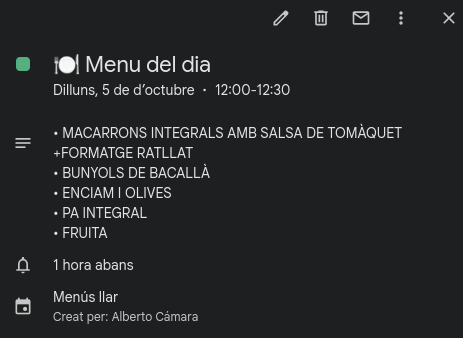
Last month, at the start of the new academic year, we started getting PDFs that no longer contained easy-to-parse text and the CLI app broke. A couple of years ago, my reaction would have been to scream:
Oh shit, we need OCR for this, do we really wanna go there?
And then give up on the project.
But it is not last year. Since then, I have done a couple of projects that involved performing OCR with LLMs, such as for example using Nanonets-OCR-s. Also, some of the recent state-of-the-art LLMs by the standard providers have excellent vision capabilities. Just to name a couple I have used lately: this is the case of the latest Gemini Pro and Flash models, and also the Qwen3 models.
After a quick discussion of available options with the AI assistant, we introduced a new feature to the original CLI app: an AI agent which submits the images coming from the PDF to an LLM which is then asked to produce the structured menus.
Since the emphasis of the task is processing an unstructured document and extracting structured data out of it, and we were already using Pydantic models to validate the outputs of the original PDF parser, there was a strong candidate agentic framework for the task: Pydantic AI.
Of course, the app is considerably more complex now, and some of the beauty in its simplicity has been lost. For instance, in order to run it now we need to provide an LLM, either by running it ourselves locally with Ollama, or by delegating to a third party. Since there is a small expense associated and a need to control the behaviour of the LLM, I wired Logfire observability into the app.
In relation with current trends
There are two agent interaction patterns that I find very interesting in application to quick prototypes and hobby projects:
- One shot. A short prompt with a generic instruction of the app you want to build, plus letting the agent run in auto mode.
- Plan carefully, then run in auto. Build a dialogue with the agent where the whole implementation is discussed in detail, using skills like
/grill-me. Then, once the agent and the human are in consensus and a plan is made, let the agent implement the plan without any further interaction.
Note: these patterns fall a bit short when building fully fledged software products, especially because bounding complexity and maintainability become central.
Header photo by Ryland Dean on Unsplash.